
For case teams
Case Intelligence & Ask Caidwise
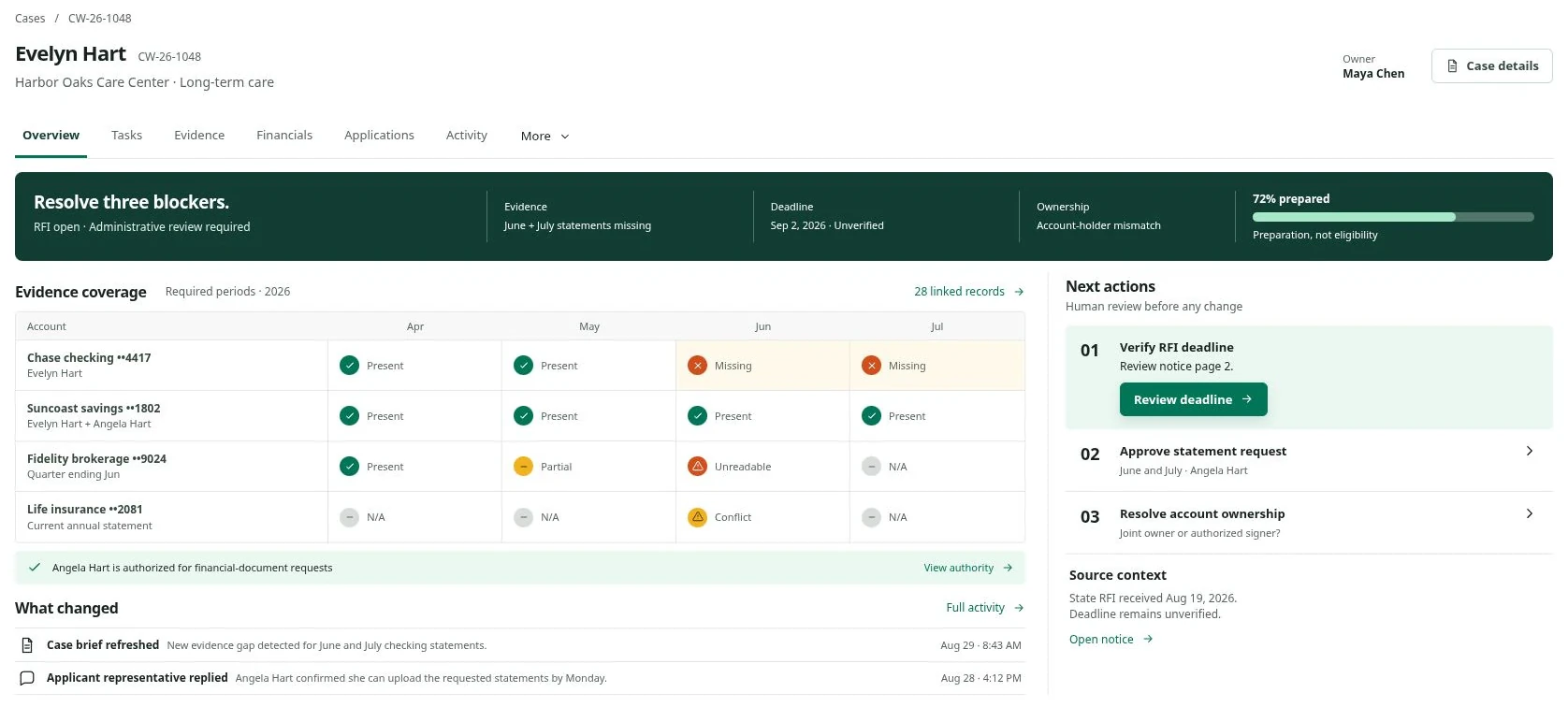
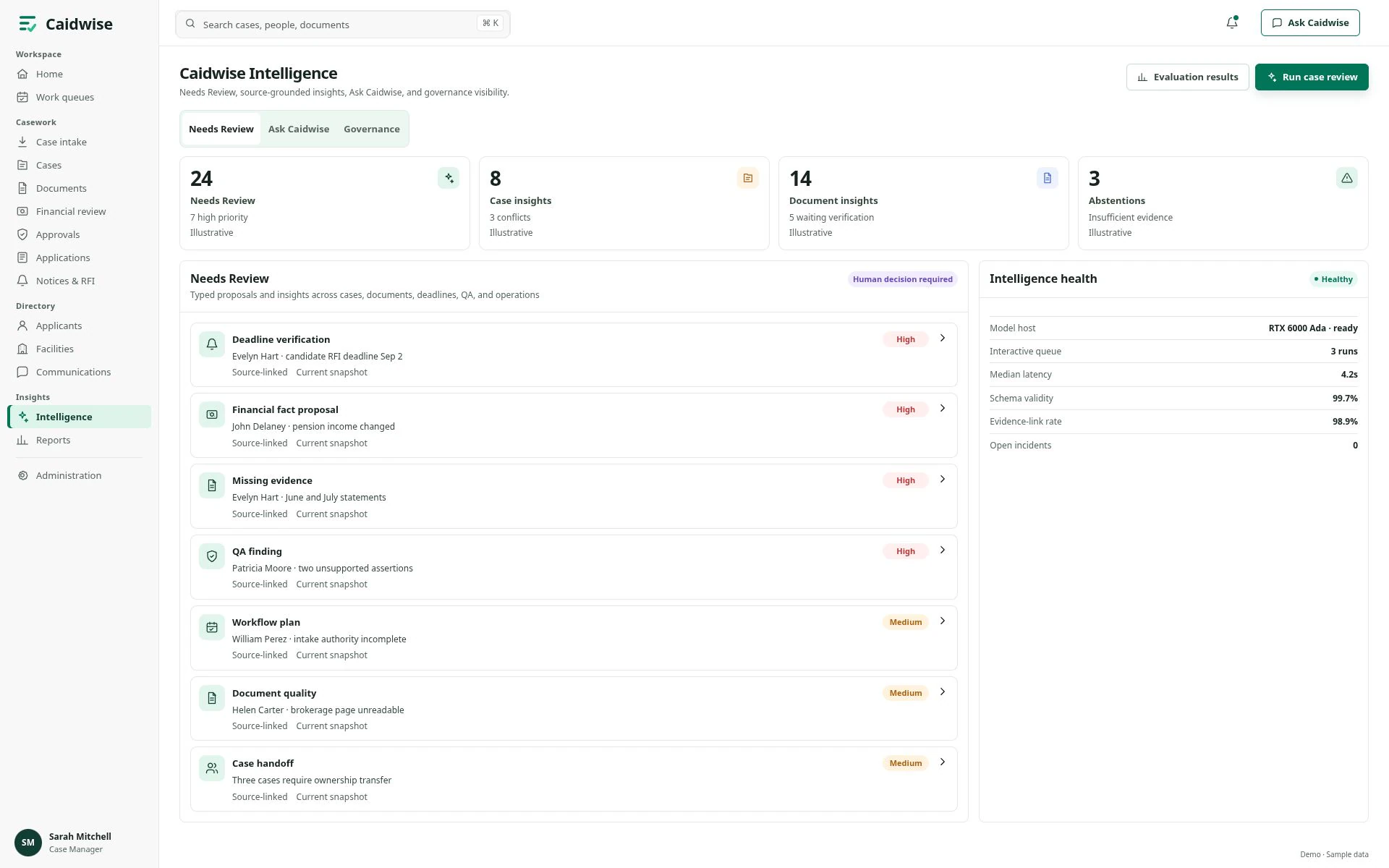
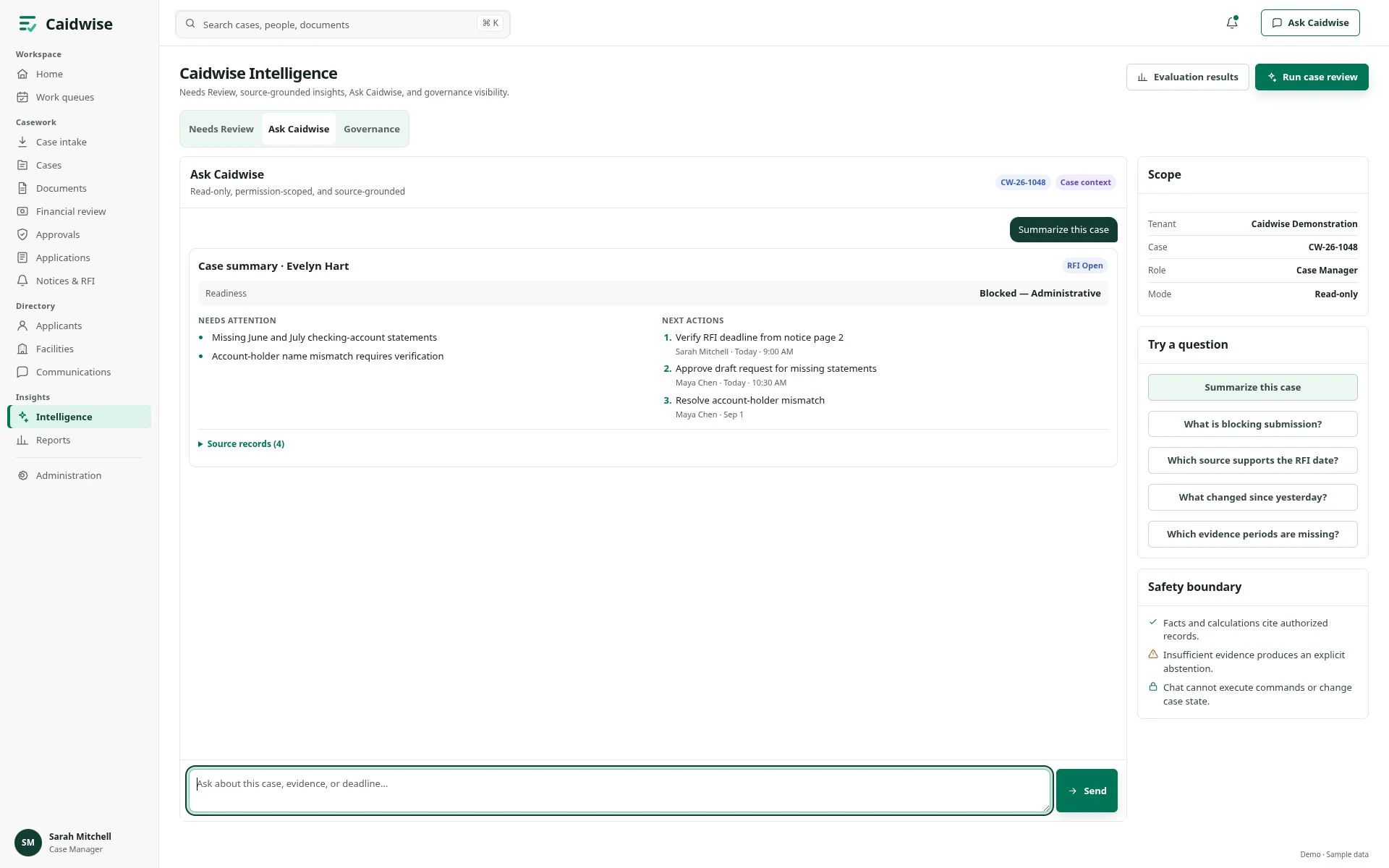
Read the case brief and key findings. Ask about recorded evidence, blockers, and dates in a side chat without leaving the page.
See Caidwise IntelligenceIntelligence first. Human always.
Caidwise gives nursing facilities and case teams one shared record for every Medicaid-pending resident: the evidence, the deadlines, the agency requests, and the next step. AI-assisted review points to what needs attention; a person makes every decision.
Version 1.0 · October 1, 2026 · previews use fictional data · Roadmap
Why Caidwise
A long-term care application depends on months of financial records, people in several places, and dates set by the agency. Most delays come from the paperwork around the decision, not the decision itself.
A missing statement month or an unreadable page sends the application back for rework, or toward an avoidable denial.
Agency requests for information arrive with due dates that live in one person’s inbox until they are missed.
An application filed after the intended coverage month can put payment for the care already given at risk.
The facility, the family, and the case team each hold part of the case, so no one sees what is complete and what is not.
Caidwise keeps one record per case, shows exactly which evidence is missing, and puts every deadline in front of an owner.
The casework journey
The interface previews illustrate how these workspaces fit together. Review can return to an earlier step as new evidence or questions arrive.
Bring referral details, the applicant, the facility, and the case owner into view.
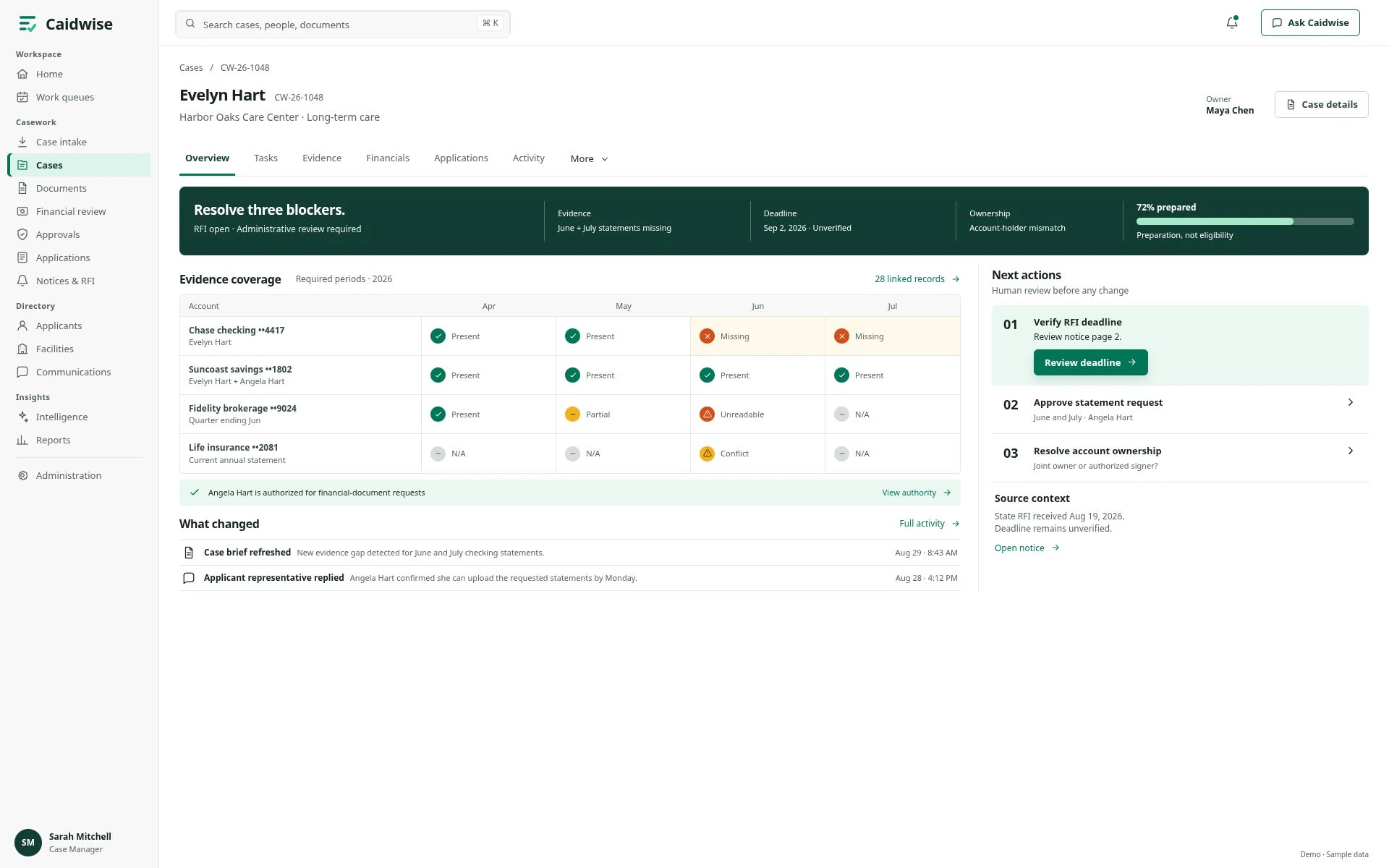
See required documents, missing statement periods, and items to request from the applicant or facility.
Use Case Intelligence, Document Review, and Financial Review to examine findings, gaps, and conflicting values.
Inspect a proposal and its context, then approve, reject, edit, or return it for further work.
Explore application stages, notices, dates awaiting verification, and requests for information.
What each workspace helps you do
Each view has a place in the casework journey. Explore the workspaces and see how they support the people involved.
For case teams
Read the case brief and key findings. Ask about recorded evidence, blockers, and dates in a side chat without leaving the page.
See Caidwise IntelligenceFor case & financial reviewers
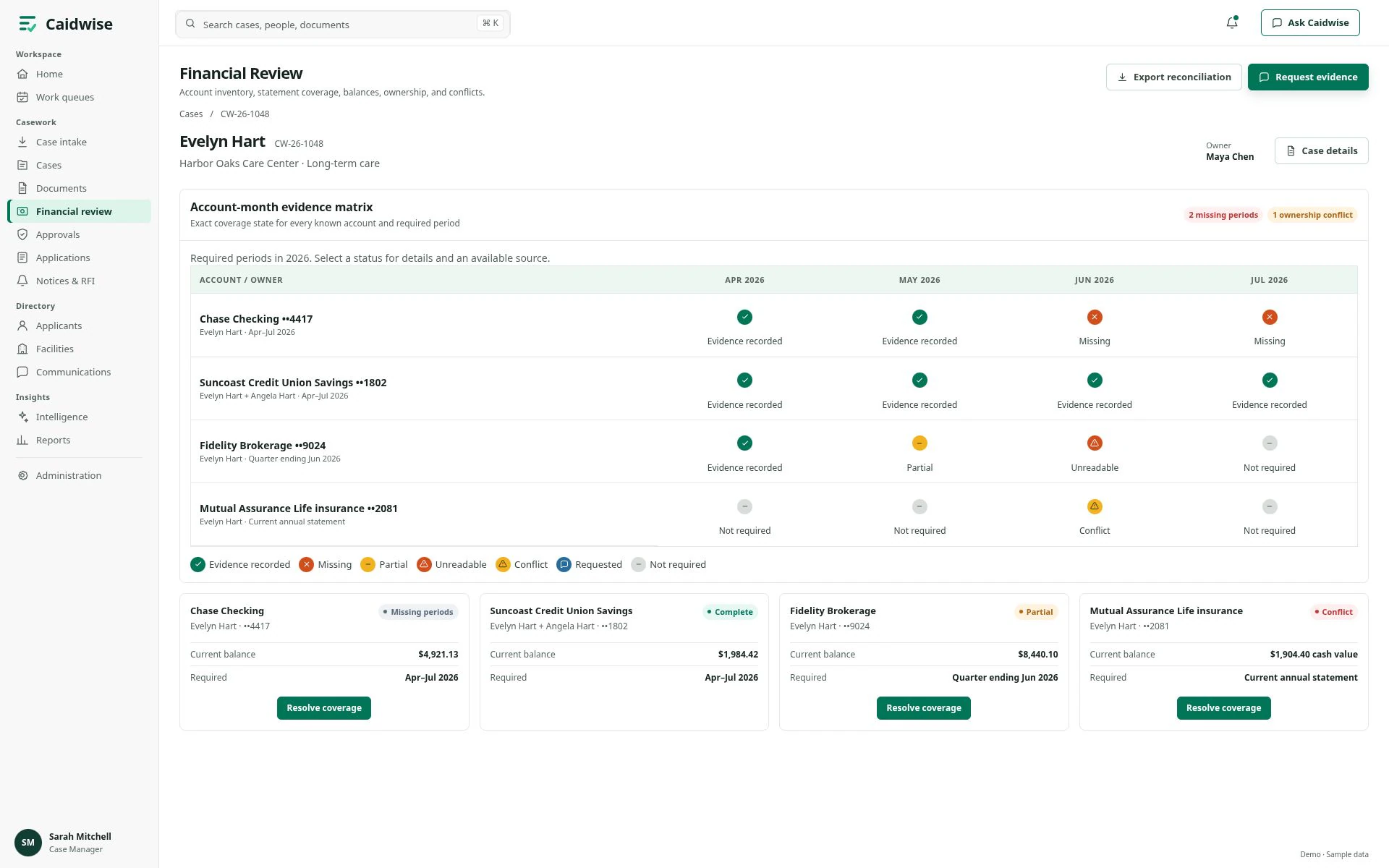
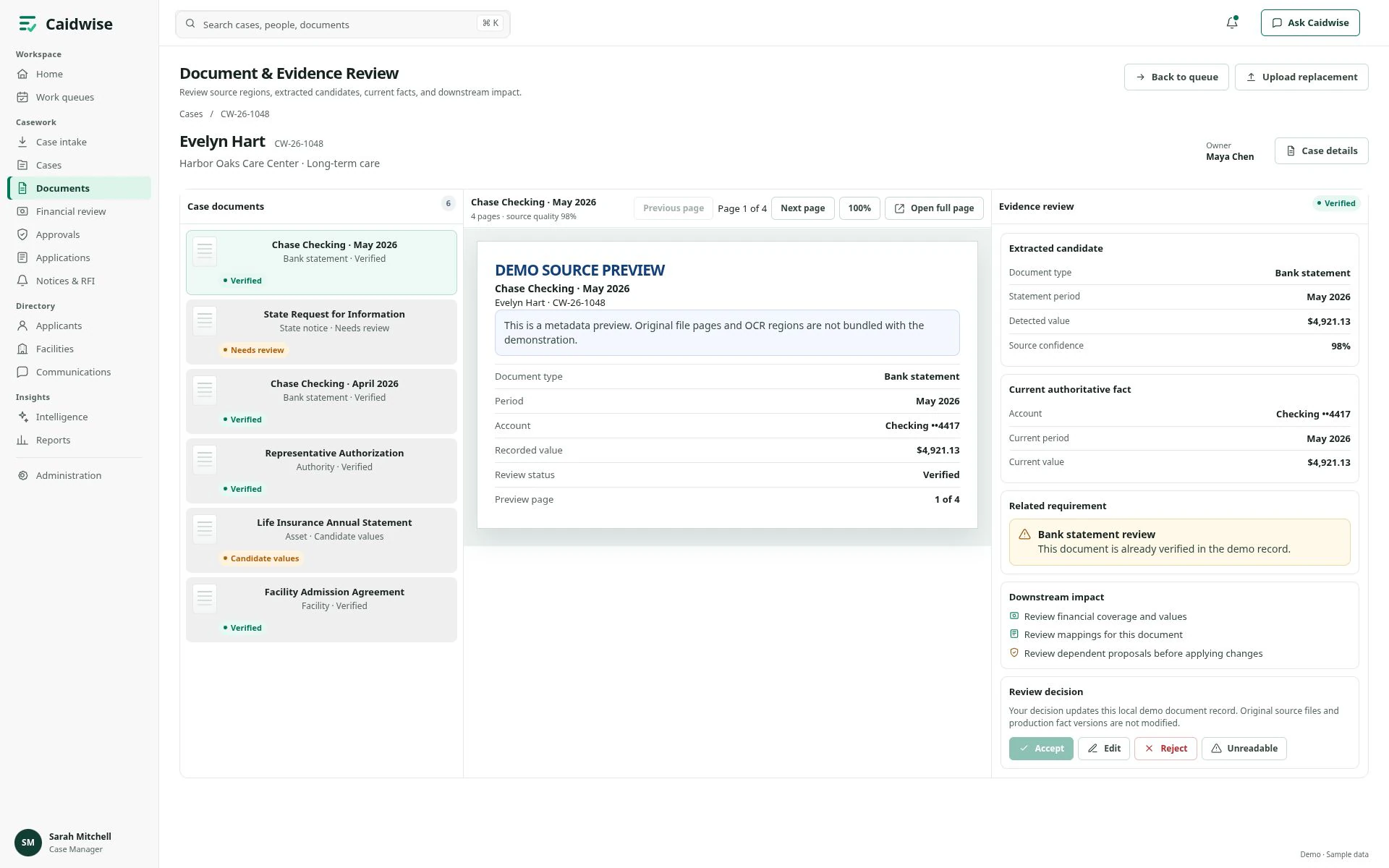
Compare document metadata and recorded values with the related requirement. Inspect missing statement periods, balances, and ownership conflicts.
Explore review screensFor reviewers & QA teams
Review proposed changes and their supporting context. Record an approval, rejection, edit, or return, with reasons where required.
For application & case teams
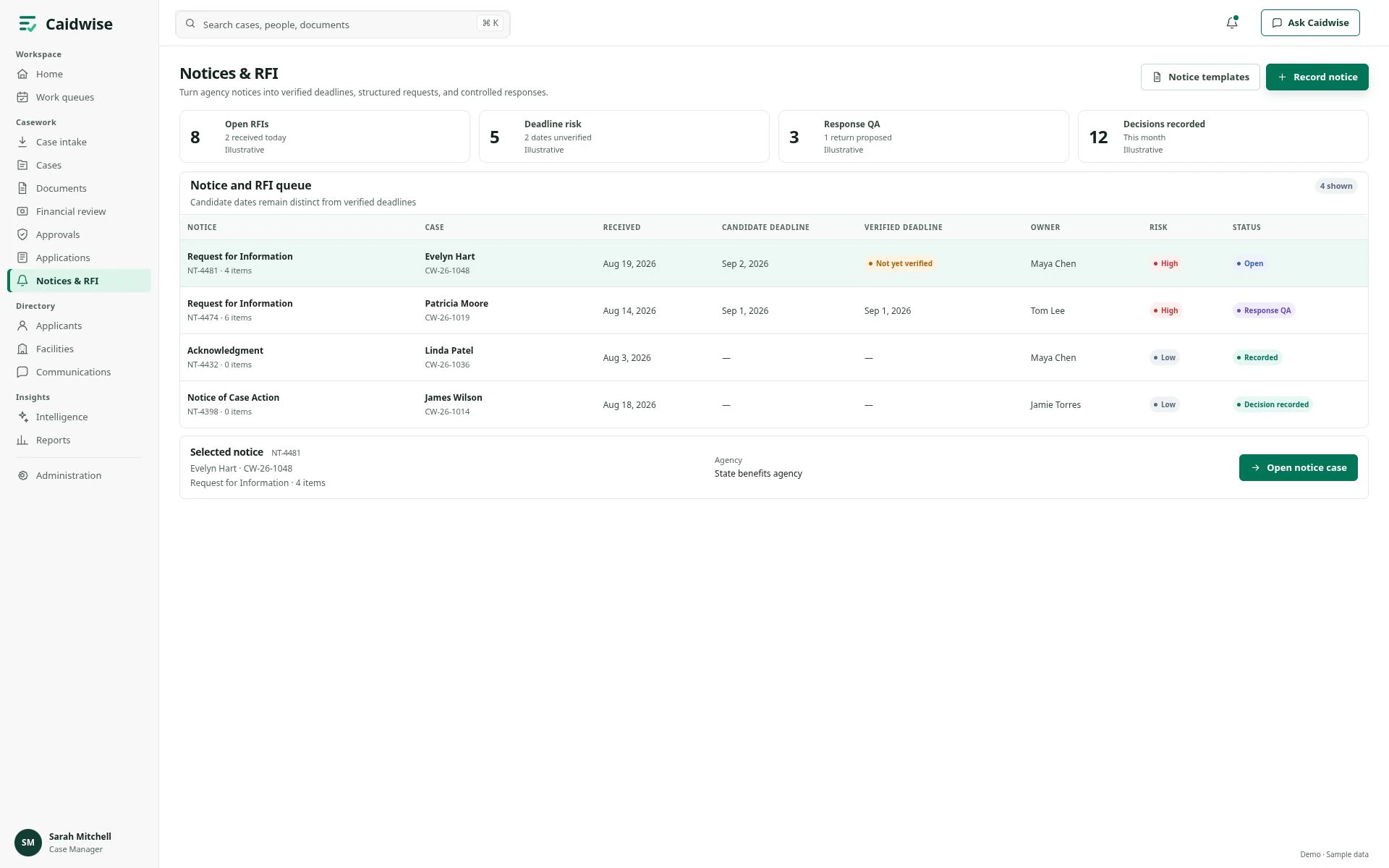
See application preparation stages, notices, and requests for information. Distinguish dates awaiting verification from dates marked verified.
See notices & RFIFor applicants, representatives & facilities
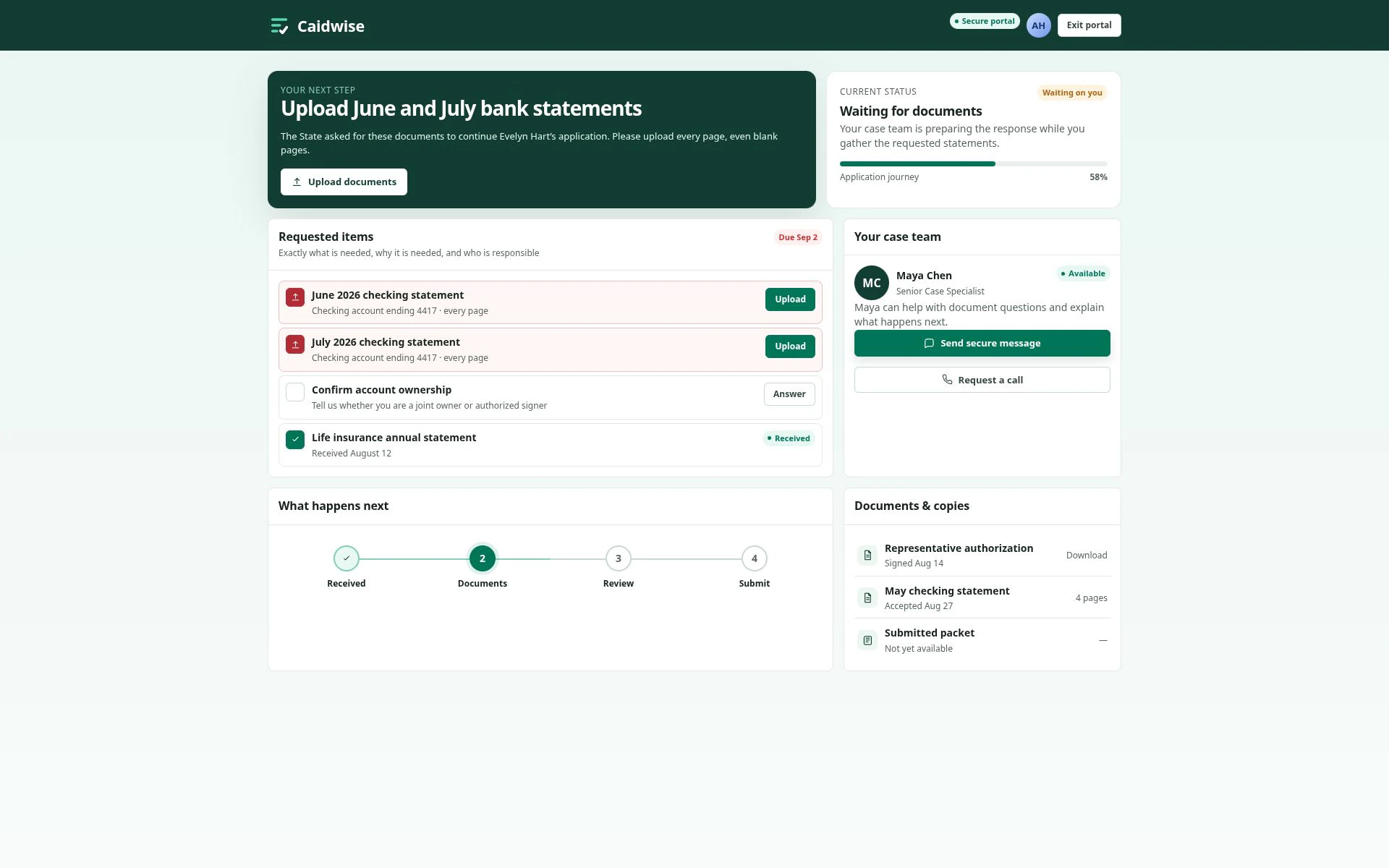
Show applicants their requested items, case team, and application stage. Give facility contacts a resident view with follow-up actions.
See the applicant portalFor operations managers
Explore workload, readiness, delay ownership, and quality views, with related records for more context.
Work away from the desk?
See the native mobile experienceProduct tour
Explore AI-assisted review, evidence, case decisions, and follow-up. Choose a view or use the arrows to take a look around.
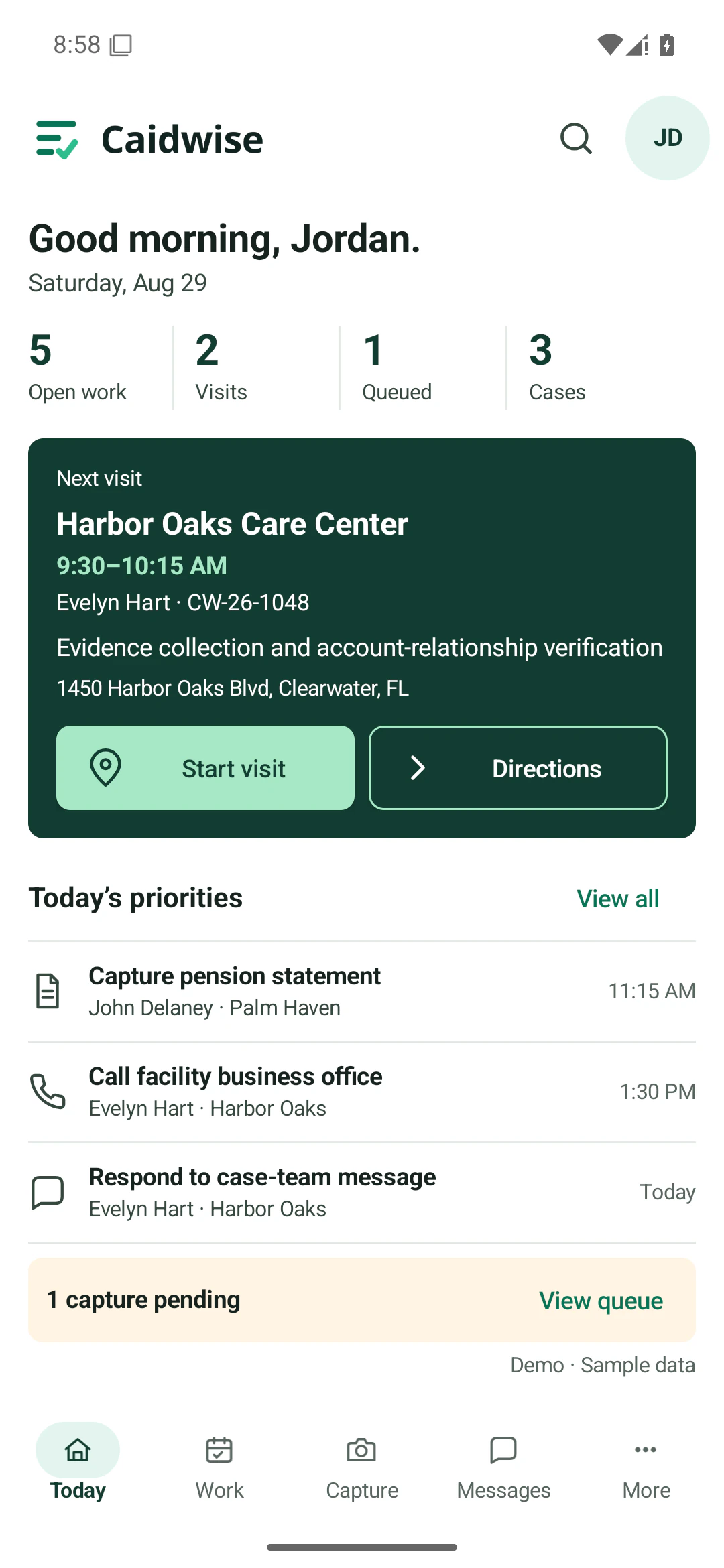
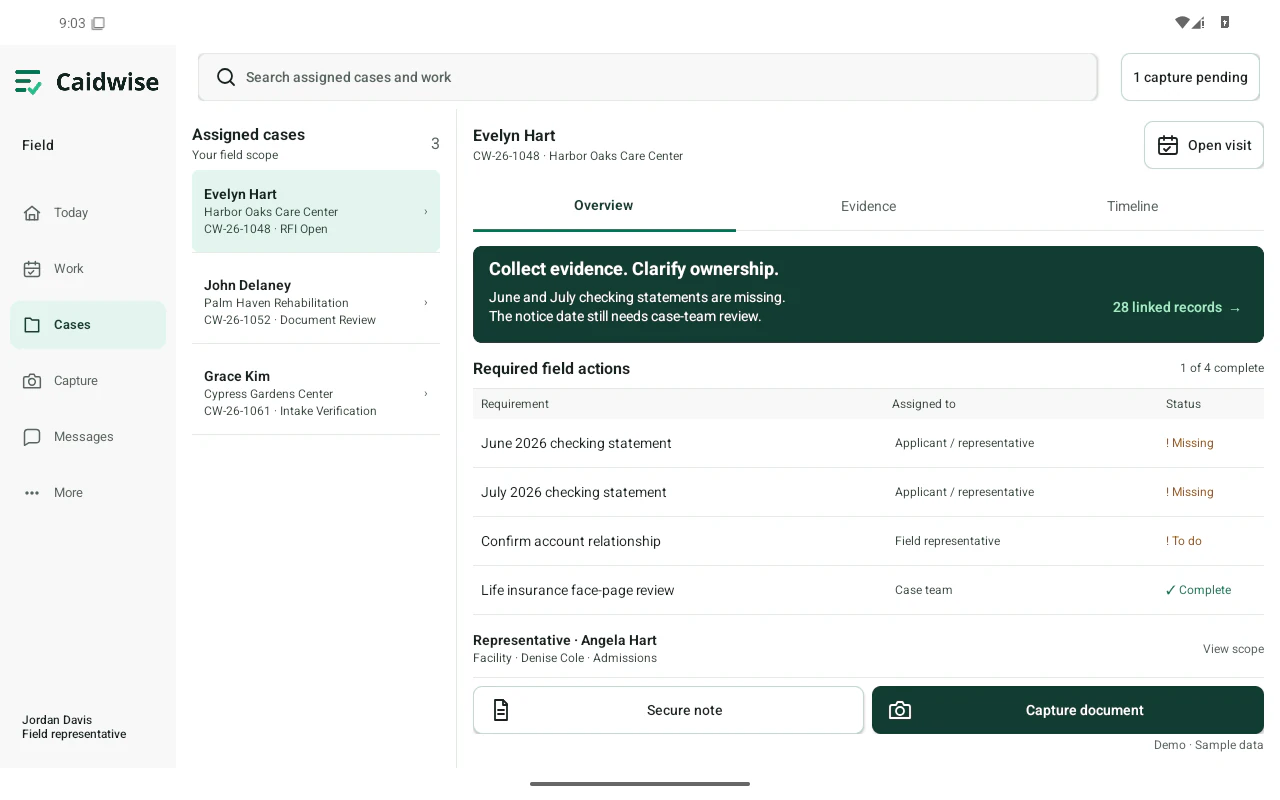
For field representatives
The native mobile experience brings assigned work, visits, evidence capture, and case context to phone and tablet.
Data and human oversight
What the product does with case information, and who can see or change it.
AI-assisted findings are proposals. A person approves, rejects, edits, or returns each one, and the record keeps who decided, when, and the reason where one is required.
Releasing an application questionnaire and deleting personal data each need approval from two different people.
Access follows role and relationship: applicants see their own requests, facility contacts see a resident view for follow-up, and platform administrators do not see case Intelligence.
Findings and candidate values sit next to the records they came from, so a reviewer can check them before acting.
This public website has no case uploads or forms. The product screenshots use fictional case data.
Ask for the current security and privacy summary, hosting and access controls, and the agreements your organization requires.
Modules at a glance
One platform for the whole application, from the first referral to the final notice. Here is what each part does, who it is for, and when it is available.
| Module | What it does | For | Availability |
|---|---|---|---|
| In Caidwise 1.0 | |||
| Case Intelligence & Ask Caidwise | Read the case brief and key findings. Ask about recorded evidence, blockers, and dates in a side chat without leaving the page. | Case teams | October 1, 2026 |
| Document & financial review | Compare document metadata and recorded values with the related requirement. Inspect missing statement periods, balances, and ownership conflicts. | Case & financial reviewers | October 1, 2026 |
| Human approvals & QA | Review proposed changes and their supporting context. Record an approval, rejection, edit, or return, with reasons where required. | Reviewers & QA teams | October 1, 2026 |
| Applications & follow-up | See application preparation stages, notices, and requests for information. Distinguish dates awaiting verification from dates marked verified. | Application & case teams | October 1, 2026 |
| Applicant & facility portals | Show applicants their requested items, case team, and application stage. Give facility contacts a resident view with follow-up actions. | Applicants, representatives & facilities | October 1, 2026 |
| Manager Intelligence & Reports | Explore workload, readiness, delay ownership, and quality views, with related records for more context. | Operations managers | October 1, 2026 |
| Coming next | |||
| Caidwise Mail | Receive every inbound email in one place. Link messages and their attachments to the right case, and send requests for additional documentation from the case. | Case teams | November 1, 2026 |
| Caidwise mobile | Brings assigned work, visits, evidence capture, and case context to phone and tablet. | Field staff | December 1, 2026 |
| Caidwise Voice | Make and receive calls and text messages from the app, with call records and recordings added to the case file automatically. An AI agent can wait on hold for your team and hands the call over when a person answers. | Case teams | December 1, 2026 |
| Employee onboarding & training | Onboard and train new staff, and track each person’s readiness for their role. | Staff & managers | In development |
Current release: Caidwise 1.0. Our October 1, 2026 launch brings case records, evidence review, deadlines and human approvals into one workspace for Medicaid long-term care applications.
The product previews on this page use fictional sample data, and the AI-assisted views show sample findings. This website does not process case information.
Coming next
Email and attachments linked to the right case.
Assigned work, visits and evidence capture on phone and tablet.
Calling and text messaging from the case workspace.
Get in touch
See how Caidwise fits the way your team works. Email us with a few details and we’ll arrange a walkthrough:
Please do not include any resident’s or applicant’s information in your message. We will agree on a secure channel before any case detail is shared.